Review Placement
Confirm where the Gift Supplier logo or supplied artwork appears.
Custom Promotional Gifts • OEM/ODM Manufacturing • Worldwide Delivery
Confirm where the Gift Supplier logo or supplied artwork appears.
Review the artwork’s approximate size relative to the selected product.
Confirm the general visual direction before sampling or production.
Preview how the Gift Supplier logo, artwork and brand colors may appear on selected promotional products before sampling or production. Digital mockups help review placement, approximate size, orientation and overall presentation.
Digital mockups provide a visual reference for artwork placement and presentation. They do not automatically confirm exact physical color, texture, dimensions or production finish.
A custom product mockup is a practical artwork-review reference. It helps establish the intended visual direction, but it should not be treated as an exact physical sample or final production result.
Confirm the intended branding position on the front, back, side or another available decoration area.
Review how large the Gift Supplier logo or supplied artwork appears relative to the product.
Check whether the artwork is centered, rotated or aligned correctly with the product shape.
Compare the intended product and artwork colors using the supplied digital references.
Review how the selected product, branding and packaging direction work together visually.
Screen colors do not guarantee the final appearance of ink, molded material, fabric, coating or packaging.
A digital layout cannot fully reproduce surface texture, gloss, softness, transparency or tactile finish.
Product proportions may be visually represented, but technical dimensions should be confirmed separately.
The mockup does not automatically confirm print sharpness, engraving depth, embroidery texture or molded detail.
Production tolerances and batch variation should be assessed using the agreed sample and production requirements.
Physical approval note: For projects where physical color, material, texture, product dimensions or decoration quality are important, review an available physical sample or pre-production reference before bulk production.
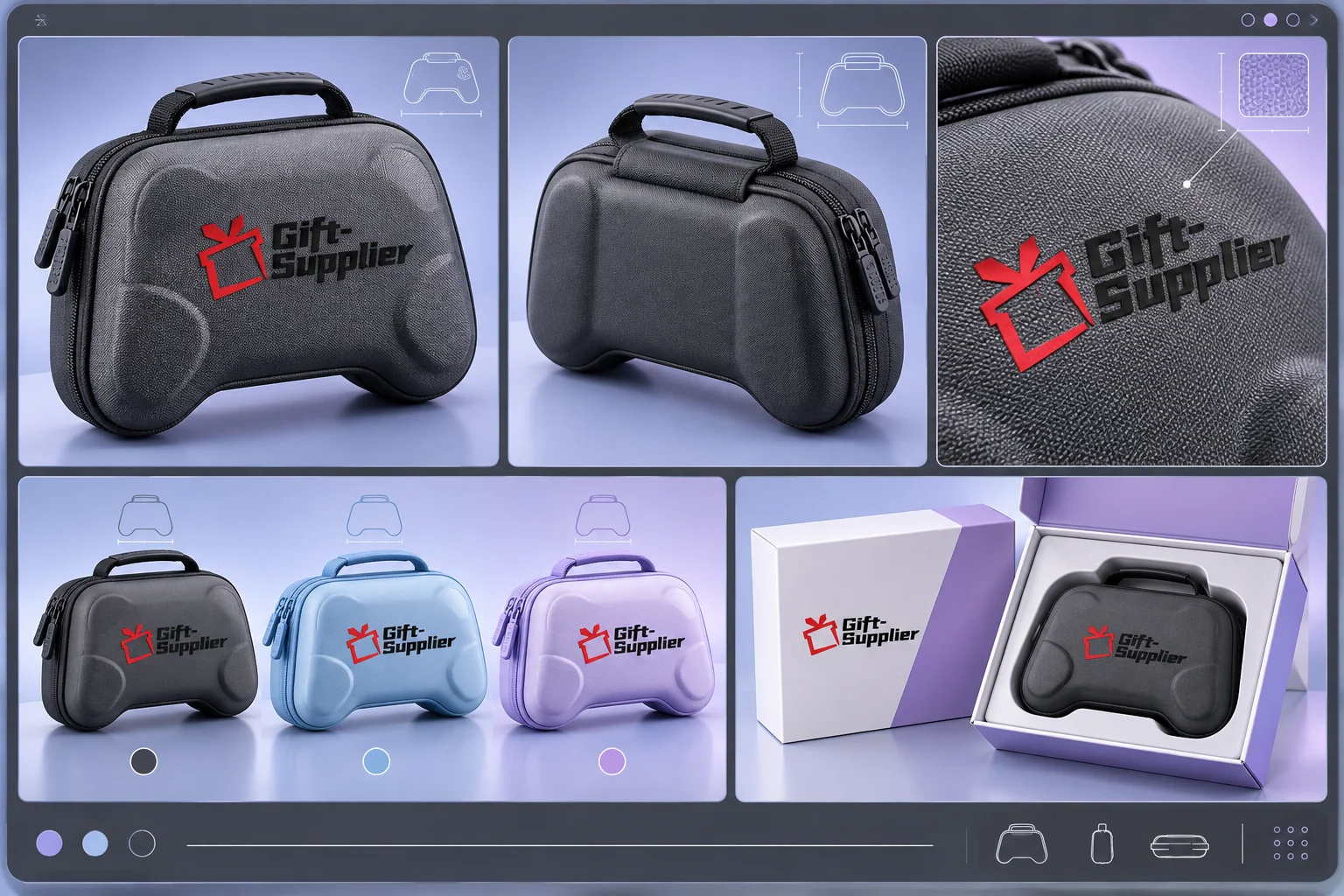
A useful mockup can show different sides, branding areas and presentation details. The required views depend on the product shape, artwork placement and project complexity.
Shows the main product angle and the most visible Gift Supplier logo placement.
Shows branding, controls, closures or construction details located on another side of the product.
Provides a closer view of the intended print, engraving, embroidery, molded detail or other branding area.
Displays approved color directions side by side to help compare the general visual presentation.
Shows how the product may appear inside a carton, sleeve, pouch or coordinated presentation box.
View selection note: Not every project requires all five views. The mockup set should focus on the product areas, branding placements and presentation details that require buyer review.
Clear product and artwork information helps us prepare a more useful visual reference and reduces unnecessary mockup revisions.
Provide the selected product link, catalog reference, photograph, technical drawing or another clear product reference.
Upload the required logo or artwork as an editable vector file, such as AI or EPS, or as an editable PDF whenever possible.
Identify the intended front, back, side, lid, strap or another available decoration area.
Provide the preferred dimensions or indicate whether the artwork should appear small, medium, prominent or within a specific available area.
Share the intended product color, artwork colors and relevant Pantone references or approved physical references when available.
Indicate the intended branding method where known, such as screen printing, UV printing, laser engraving, embroidery, embossing, molding or another decoration process. The proposed visual treatment may need to be adjusted to suit the practical decoration area, material and production method.
Confirm which mockup views are required and when the approved visual reference is needed for the next project stage.
Reference note: If the exact product specification or decoration area has not yet been confirmed, the first mockup may be prepared as a visual direction and updated after the technical details are available.
The mockup process helps confirm the intended branding direction before sampling or production preparation. The exact review route depends on the product, available references and project complexity.
Provide the selected product reference, Gift Supplier logo or artwork, preferred colors and available project details.
Review the available branding position, approximate printable area and applicable decoration method.
Place the artwork using the agreed position, approximate size, orientation and color direction.
Identify any required adjustments to placement, scale, alignment, color direction or presentation.
Confirm the mockup as a visual reference for sampling, quotation review or production preparation.
Approval clarification: Mockup approval confirms the visual direction shown in the layout. It does not replace a physical sample when exact material, color, texture, dimensions or production finish must be reviewed.
Each revised mockup should be clearly identified by version or revision. Before the project moves forward, confirm which mockup version, artwork file and product reference are approved for the next stage.
Approval of a revised mockup should replace earlier visual references only when the revised version has been clearly confirmed. This helps reduce the risk of an outdated layout, artwork file, product image or branding position being used during sampling or production preparation.
Find answers about artwork files, mockup views, revisions, colors, physical samples and approval for custom promotional products.
A custom product mockup is a digital visual showing how supplied artwork may appear on a selected promotional product. It can help review placement, approximate size, orientation, color direction and overall presentation.
Provide the selected product reference and an available vector artwork file such as AI, EPS, SVG or editable PDF. High-resolution PNG files may be usable for some layouts, but vector artwork is generally preferred.
Yes. The Gift Supplier logo can be positioned on compatible product mockups to compare branding areas, product colors and general presentation across different product categories.
Yes. Depending on the project, mockups may include a primary view, reverse view, decoration close-up, colorway comparison or packaging presentation.
No. Screen displays and digital files cannot guarantee the exact physical appearance of inks, molded materials, textiles, coatings or packaging. Use a Pantone reference and physical sample when color accuracy is important.
No. Mockup approval confirms the intended visual direction. A physical sample may still be required to review material, dimensions, texture, decoration quality, packaging fit and production finish.
Yes. Clearly identify the required changes to artwork placement, approximate scale, orientation, product color or presentation. Major product or artwork changes may require a new mockup direction.
Yes. Where relevant, the mockup can show a product inside a carton, sleeve, pouch or presentation box. Final packaging dimensions and structural details should be confirmed separately.
Timing depends on the number of products, required views, artwork quality, available product references and requested revisions. Share your required review date when submitting the project.
The approved mockup may support quotation review, sample preparation or production planning. The next step depends on whether physical samples, technical confirmation or additional artwork approval is required.
Share your selected product or product reference, artwork, preferred branding position, approximate artwork size, color references, intended decoration method and required mockup views. If the exact product or branding area has not yet been confirmed, let us know so the first mockup can be prepared as an initial visual direction rather than a production reference.
Share your basic product requirements, and our team will review your enquiry and contact you to discuss the next steps.
Have more project details? Complete our full quotation form.